Change order log template with a running contract sum
A change order log lists every change on a job — number, date, description, status, amount and days — and keeps a running contract sum that only approved change orders move. Download the blank log below, or export a filled one from the change order form.
Download the change order log (.xlsx) All blank templates
The columns, and the one that decides
| Column | Content | Why |
|---|---|---|
| A · Change order no. | CO-001, COR-004, … | Requests and change orders in one numbered list |
| B · Date | Issue or approval date | Sort and audit |
| C · Description | One line; the full scope stays on the change order | Find the document quickly |
| D · Status | Approved, Pending, Rejected, Void (drop-down) | Decides whether the row moves the contract sum |
| E · Amount ± | Positive for an increase, negative for a decrease | Line 4 of that change order |
| F · Days ± | Change in contract time | Running time extension |
| G · Contract sum after (approved) | =IF(E8="","",N($G$5)+SUMIFS(E$8:E8,D$8:D8,"Approved")+…) | Original sum plus approved amounts up to that row |
Most free logs add every amount down the column. That inflates the contract sum the moment someone records a pending request with its price. Here the status column carries the logic: column G sums only rows marked Approved (plus the row an export marks This change order), and two totals at the bottom separate the approved net change from the pending exposure.
Worked example: a fire station
Cedar Point Fire Station 6 has an original contract of $3,865,000.00. Three change orders are approved, a time-and-materials request for rock at footing F-7 is pending, and one owner request was priced and rejected:
| No. | Description | Status | Amount | Contract sum after |
|---|---|---|---|---|
| CO-001 | Add sleeve for future fiber | Approved | +$3,120.00 | $3,868,120.00 |
| CO-002 | Delete apparatus bay trench drain extension | Approved | −$4,870.00 | $3,863,250.00 |
| CO-003 | Upgrade generator transfer switch | Approved | +$11,260.00 | $3,874,510.00 |
| COR-004 | Rock removal at footing F-7 (time and materials) | Pending | +$9,499.00 | $3,874,510.00 (unchanged) |
| COR-005 | Add epoxy floor to the hose tower (owner request) | Rejected | — | $3,874,510.00 (unchanged) |
Approved net change: +$9,510.00. Pending: +$9,499.00. The contract sum stays at $3,874,510.00 until COR-004 is approved — and that figure is exactly what line 3 of CO-004 must show, because the G701 instructions define line 2 as the net change by previously authorized change orders. The log and the next change order check each other.
Exporting a filled log from the form
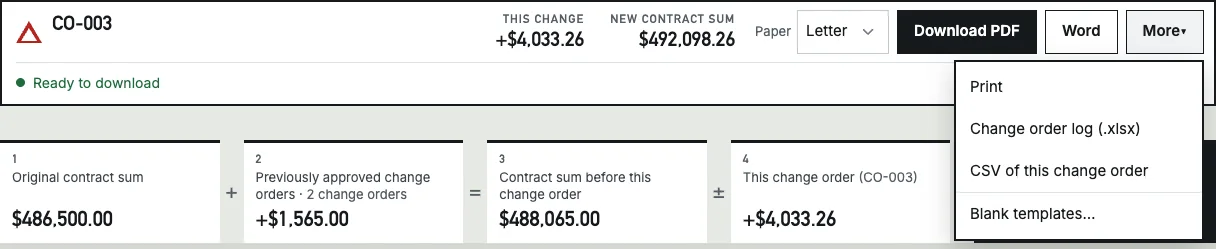
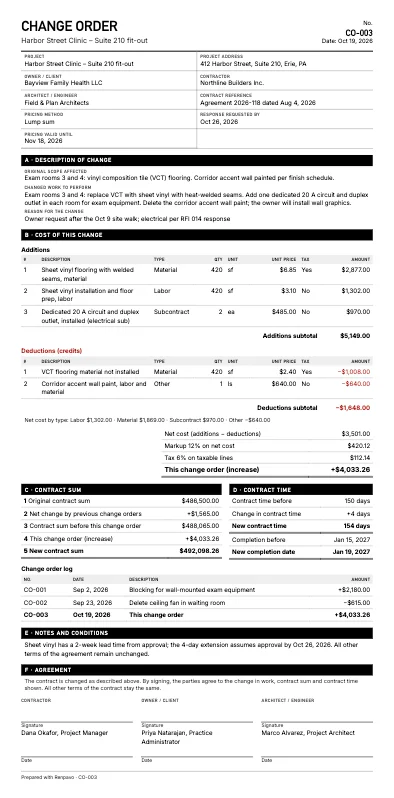
When you list earlier change orders in Part C of the change order form, More → Change order log (.xlsx) writes them into this layout with the current document as the last row — marked This change order, or Pending if the document type is a request — and 15 empty rows for the next ones. The same list prints as a small log table on the PDF itself.
Three habits that keep a log honest
- Never edit an approved amount. If an approved change is corrected, add a new change order for the difference. The log then reconciles with the signed documents line by line.
- Record days in the same row. G701 asks for each change order’s change in contract time; the days column adds those up into the running extension, so a missed or doubled extension shows.
- Reconcile at every pay application. The approved total in the log should equal the change order line on the payment application. If it does not, a change order is missing from one of them.
Questions
Should rejected change orders stay in the log?
Yes. Keep the row with status Rejected or Void so the numbering has no gaps and the history of what was asked for stays visible. The template’s formulas ignore those rows when they total the contract sum.
Does the log replace the change orders themselves?
No. The log is an index and a running total. The signed change order, with its description and cost breakdown, is still the record of what was agreed.
Does the template work in Google Sheets?
It uses only IF, N, SUMIFS and a drop-down list for the status, all available in Google Sheets. Upload the .xlsx to Google Drive and open it with Google Sheets.
Sources
Sources opened on October 29, 2026. All amounts on this page are calculated from the example change orders; percentages are taken from the cited source or stated as an example, not as a recommended rate.
More change order guides
- AIA change order form (G701): the five lines, worked through three change ordersLine by line through CO-001, CO-002 and CO-003 on one job, and the check that catches a wrong line 2.
- Change order request vs. change orderWho starts each document, whether it changes the contract, and the same clinic change written both ways.
- Deductive change orders: does the credit carry markup?A value-engineering swap priced with markup on the net and on additions only — and why the gap is 10% of the credit.
- Construction change directive (CCD): what it is and how the work gets pricedDirected rock removal priced afterwards: one flat markup gives $9,499.00, Caltrans-style markups by cost type give $10,293.96 against a $9,500 cap.
- Change order template: blank Word, PDF and Excel formsFree fill-by-hand form in Letter, A4 and Word, with the six arithmetic checks a hand-filled change order needs.